19.06.2026
Multisig Wallets for Business: Setup, Security, and Risks
Read article

A customer has asked twice whether they can pay in USDT. Or a wire from an overseas client has sat for a week again. So you start reading about crypto payment gateways, and every homepage shows you the same thing: one big percentage.
That percentage is only the first of your costs, and at small volume it is not the one that decides your bill. What decides it is how often you move money out of the gateway. Below roughly $4,000 a month, a 1% service you sweep once a month beats a 0.5% service you empty after every order — the withdrawal habit outweighs the whole half-point of rate. Above that, the percentage starts to be worth negotiating. The arithmetic that produces the four-thousand line is further down, with the numbers shown.
A crypto payment gateway sits between your customer's wallet and your accounting. It issues a fresh receiving address for each order, watches the blockchain for the transfer, decides when the payment counts as complete, converts it, credits it to your merchant balance and tells your system what happened. You never touch a wallet or reconcile a partial transfer against an invoice at midnight.
That last part is the whole point. You can put your own wallet address on a checkout page instead — and then you own the messy half. Two customers pay the same amount within a minute, and you cannot tell which order was paid. One of them sends $19.40 on a $20 invoice, and someone has to decide what happens next. A crypto payment system exists to make those moments mechanical.
Here is what happens between the customer clicking "pay" and the money being yours, in order:
Those four stages matter more than they look. Act on stage 2 and you will eventually hand something over for a transaction that never confirms. Your backend should trust the order status. Not the customer's screenshot.

Advertised rates start at a fraction of a percent, and several vendors quote theirs as a "from" price — the floor of their own scale, rarely what an ordinary volume pays. Whatever the number turns out to be for you, it is one of four bills.
Bill one — the gateway's rate. A percentage of each successful payment. CryptumPay charges 1% per successful payment, from 0.5% at large volume, and the fee can be passed on to the payer instead of absorbed by you.
Bill two — the network fee. This goes to the blockchain, never to the gateway. Your customer pays it on the way in. You pay it on the way out, every single time you withdraw — every time you sweep, in the jargon, meaning move the accumulated balance from the gateway to your own wallet. This is where quiet money goes.
Bill three — the conversion spread. The spread is the gap between the rate you actually get and the rate you would see quoted on an exchange screen. If a customer pays in one asset and your balance ends up in another, something converted it, and conversion is never exactly free. Ask what rate is used and at which moment it is fixed.
Bill four — the withdrawal terms. Beyond the fee: is there a minimum withdrawal amount, how long does a payout take, and can a compliance check hold one up. A service with a low rate and a $100 minimum is expensive for a business doing $300 a month.
Moving USDT out on the TRON network costs about $2.11 a transfer. That is the number to hold on to; the rest of this paragraph is where it comes from. A transfer checked on 9 August 2026 burned 64,285 energy, which you can see on the transaction itself in a block explorer.
Energy is TRON's unit of computation, billed at 100 sun, and one TRX is 1,000,000 sun, as TRON's documentation on paying for resources sets out. So that transfer cost 6.43 TRX, and TRX was $0.3287 that day. Sending to an address that has never held USDT costs materially more, because the transfer has to create a new record in the token contract. Keep the wallet you sweep to funded rather than rotating to fresh ones.
Now take $200 of sales through one of the routes your customers will actually use, USDT on TRON, and run it twice.
Same sales, same rate, more than five times the cost. Now halve the rate and watch almost nothing happen: at 0.5%, those ten payments still cost about $22. At this size you are choosing between habits, and the percentage is a rounding error.
This flips as you grow, and it is worth knowing where. Nine extra withdrawals a month cost about $19. Halving a 1% rate also saves $19 — at about $3,800 of monthly volume. So somewhere around four thousand dollars a month is the crossover: above it, the percentage becomes the thing to negotiate, and below it your withdrawal schedule writes the bill. That line assumes two things: the comparison above, ten withdrawals against one, and a withdrawal that costs about $2.11, as it does on TRON. Withdraw less often and the line comes down, because there is less withdrawal cost for the half-point to beat — at four sweeps a month it sits closer to $1,300. On a network with cheaper transfers it comes down further still.
The practical instruction is one sentence. Sweep once a week or once a month instead of after every order, and pick the network deliberately, because the differences between USDT networks are large enough to be worth choosing on purpose.
If you want the network side pulled apart — why fees move, what each network costs, who ends up paying — there is a detailed breakdown of how crypto payment fees work. And when you get to comparing actual services, the axis that matters is total cost at your real withdrawal frequency, which a dedicated guide on how to choose a crypto processing platform walks through properly.
There are three ways in. They are usually sold as easy, medium and hard, which is the wrong axis, because two of them take the same afternoon. Sort them with two questions instead.
Does your website itself need to know that an order has been paid? If access, a download or a shipment has to switch on by itself, the answer is yes and only route 3 does it. No plugin substitutes for it. In developer language this is the question of who holds the state of the order — you, or the gateway.
Does the customer have to stay on your page while they pay? If sending someone to a separate invoice page would look improvised, you want the widget. If you already send invoices by email or chat, a link is enough.
What it is. You create an invoice in the merchant console and send the link by email, chat or message. The customer opens a hosted payment page, pays there, and the result appears in your dashboard.
Who it's for. Services, consulting, B2B invoices, one-off deals — anyone who bills rather than sells from a shelf. It is also the cheapest way to find out whether your customers actually want to pay in crypto, before anyone spends a developer-week on it.
What your developer does. Nothing.
What goes wrong. You are the automation. Nobody gets access until you look at the dashboard and switch it on, so this stops working the week you go on holiday. There is more on payment links and QR invoices if this is your route.
What it is. A script on your page and a button. The button opens the full checkout in a window over your site. The gateway still runs the payment and still knows its state; your page just opens the window.
Who it's for. Anyone with a real Buy button — a shop, a subscription page, a booking form — where handing the customer off to a separate invoice would break the flow. You still turn access on by hand afterwards.
What your developer does:
What goes wrong. One hard blocker that almost no guide mentions: your domain must be added to the project in the console, or the widget will not open at all. CryptumPay's documentation says it plainly — the widget only works on authorized domains. You can write perfect code and see nothing on the screen because of a missing line in a settings panel. Check that before you debug anything else.
The getting-started page in the developer documentation lists what you need before the first payment: a merchant account, a Project ID and that domain.
One more trap on this route. The browser callback tells you the customer finished the flow on their screen, which is a UI event. It is not proof that money arrived and confirmed. A walkthrough of putting the payment widget on an HTML page covers the rest of the setup.
What it is. Your backend creates the order and then listens. The gateway sends webhooks — server-to-server notifications that fire when something changes — at every status change, and your code decides what each status means for that customer.
Who it's for. Automatic delivery. Digital goods, licence keys, subscriptions, accounts that switch on at three in the morning while you are asleep. If a human has to be awake for the customer to get what they bought, you do not need this route yet.
What your developer does. The mechanics below are CryptumPay's, taken from its developer documentation; another gateway names its events differently, so brief your developer from the docs of the one you actually pick.
What goes wrong. Duplicate and retried events, almost always. The API itself is a day or two of work for a competent backend developer; the retries are where the bugs live. Send your developer the API integration checklist before they start.
The other half of the brief is the notifications themselves. A guide to handling webhooks properly covers duplicates, retries and what to log.
This is the part storefronts leave out of big type, and the part you will live with every week. Four questions separate a crypto payment processor that works from one that merely accepts coins.
Is the payment converted, and when? The bad version leaves your balance sitting in whatever the customer sent. A week between payment and withdrawal is then a week of your revenue moving on its own, and you have taken a position in an asset without deciding to. The good version converts at the moment funds are credited. That is what CryptumPay does, converting incoming payments to USDT on crediting — which also answers the timing half of the spread question, since the rate that applies is the one at crediting rather than one you choose later. How wide that conversion sits against the market is rarely on the pricing page, so ask for it in writing before you sign. Meanwhile, protecting revenue from volatility is a subject in itself.
Can you take the money out whenever you want? A minimum withdrawal amount, where one exists, quietly locks up small balances, and it is not always on the pricing page — so ask. What you want to hear is that you can withdraw to your own wallet at any moment, in any amount, manually or on a schedule you set, with no minimum at all. Ask early, because the answer changes your sweeping schedule, and by now you know what the schedule is worth.
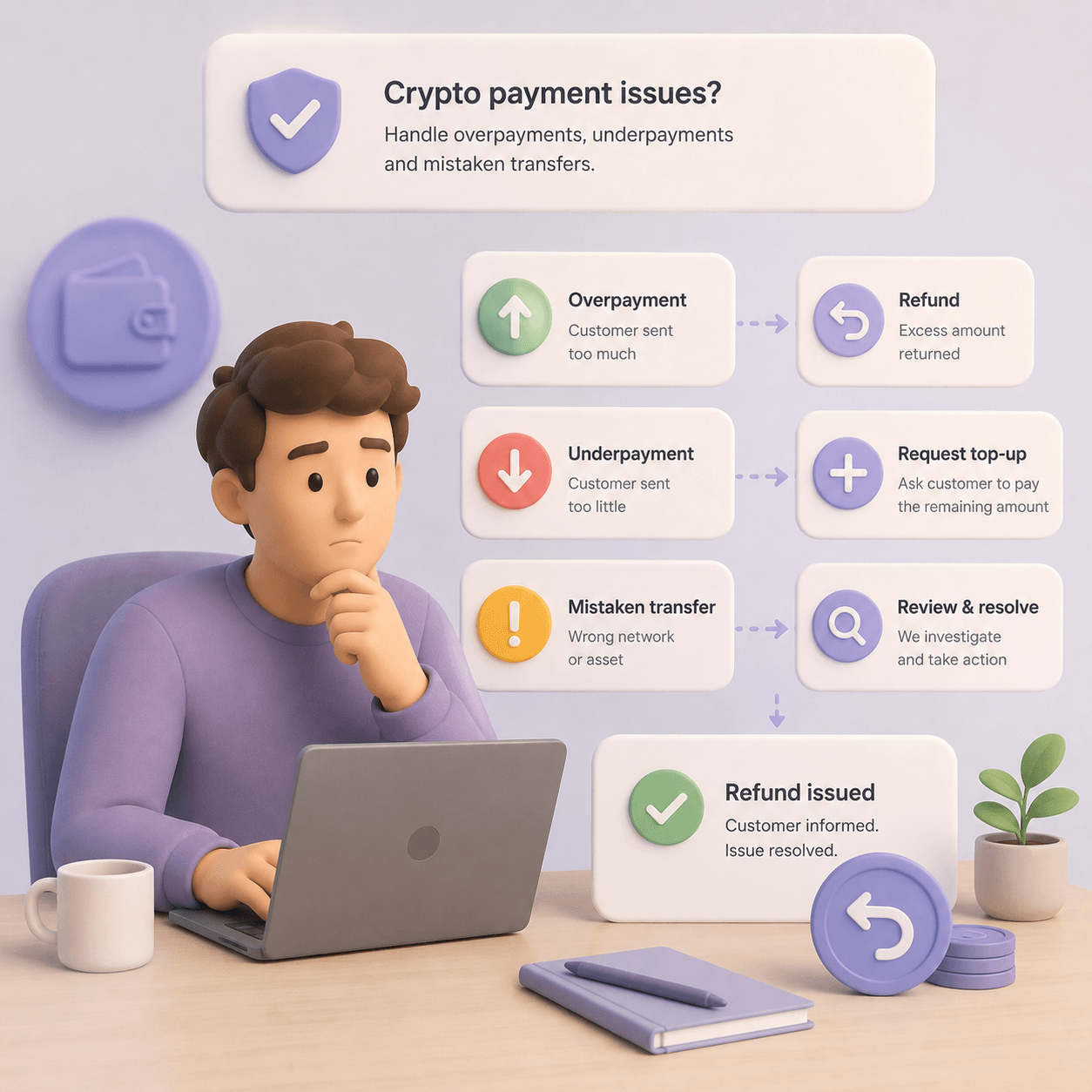
What happens when the customer sends the wrong amount? They will. Someone pays $19.40 on a $20 invoice because their wallet subtracted the network fee, or pays the same invoice twice. The bad version is a support ticket and a manual refund every time. The good version is a rule that runs without you: credit the partial amount and mark the balance owing, or reopen the invoice for a top-up, or credit the overpayment. Any of those is fine as long as you know which one applies before it happens rather than after. CryptumPay handles both underpayments and overpayments automatically — see how underpayments and refunds work.
What happens if a payment is flagged? Gateways screen incoming funds against sanctions lists and known-criminal history. The order of operations is what matters here. Funds held before they reach your balance are the screener's problem; funds credited and then frozen are yours, usually after you have already delivered. Ask where in the sequence the check happens, and what you are told when it holds something. Some background on how AML screening affects merchants helps here.
Then there is the last mile: getting from a stablecoin balance to your company's bank account. That step is usually outside the gateway's job entirely, and it is where founders are most often surprised. Plan it before you launch, not after your first $5,000 arrives — the mechanics of on-ramps and off-ramps come with their own fees and paperwork.
Nobody can answer this for you in a blog post, but you can settle it in one conversation — and you can do the first half of the work yourself, for free, tonight. The differences between countries are large enough that a general answer would mislead you. Some jurisdictions treat accepting crypto as ordinary commerce. Some regulate the gateway and leave the merchant alone. Some prohibit resident businesses from taking digital currency as payment for goods and services at all — in which case the question is not which provider to pick. Whether a narrower route stays open to you, and on what terms, is exactly the thing to put to a lawyer rather than to a vendor's sales page. A company incorporated elsewhere is a different question again.
The free half looks like this. The rule you are hunting is almost never filed under "cryptocurrency"; it is usually written as digital currency or virtual assets used as a means of payment, or as consideration for goods, works and services. That phrasing is what you search for. It normally lives in a country's digital-assets or payment-services law, and the plain-language version is normally published by whoever supervises payments there — the central bank or the financial regulator, in a guidance or FAQ section aimed at businesses. Fifteen minutes on that site tells you whether you are in an easy country or a difficult one, and which of the questions below you actually need answered.
Then take these five to a lawyer.
Ask, too, which entity the gateway itself operates under and how it is licensed or registered — then ask your lawyer what, if anything, that status covers on your side. They will want to know who is holding your funds and under whose supervision.
Do this before you integrate, not after. Everything else in this article is reversible in an afternoon; question 1 is the only one whose answer changes whether you do this at all. This article is general information about how crypto payment processing works, and it is not legal advice for your situation.
Do I need my own crypto wallet to accept payments? No. The gateway issues receiving addresses and holds the merchant balance for you. You need a wallet only as a destination for withdrawals, and that address should be one you control.
How long until the money is actually mine? Long enough for the network to confirm the transfer, plus the gateway's crediting step. How long that takes depends on the coin and the network you accept, and on the confirmation policy. The number to act on is the order status. Never release goods before the final one.
Can I accept crypto payments without KYC? Be careful with services that market this. A gateway not mentioning business verification in its connection documentation is not the same as it having no verification requirement. Assume you will need to identify your business at some point, and treat "no checks at all" as a warning sign.
What if the customer sends less than the invoice? It happens routinely, because wallets sometimes deduct the network fee from the amount being sent. The service should either credit the partial amount and mark the balance owing, or reopen the invoice for a top-up. CryptumPay handles underpayments and overpayments automatically; with any other service, find out which way it works before you go live.
Which coin should I offer if I only want to support one? A stablecoin on a cheap network. That removes the volatility problem for both sides, and low network fees keep the arithmetic above in your favour: your customer pays less to send, and you pay less every time you move the balance out. TRON is popular for exactly this reason.
Create an account and connect the checkout yourself, or talk to sales and we will plan the integration with you.